 Simple PTO Tracker
Spreadsheet for Google Sheets & Excel
Track your team's paid time off in one simple spreadsheet
For small businesses with no HR department. Log a time-off request, and every balance and the team calendar update on their own. No macros, no add-ons, no new software to learn.
Lite: free .xlsx file, up to 5 employees, no sign-up. Opens in Google Sheets, Excel and LibreOffice.

Made for small teams that handle time off themselves
Simple PTO Tracker is for owners and office managers at businesses with roughly 2 to 50 people: shops, restaurants, clinics, offices, agencies, crews. If you are the person who answers "how many days do I have left?", this is for you.
It is a spreadsheet, not an HR system. You keep full control, there is nothing to install, and nobody needs a new login.
The problem it solves
- Requests arrive by text, email and sticky note, and some get lost.
- Nobody is sure how many days someone has left, so you recount by hand.
- Two people book the same week off and you find out too late.
- New hires start mid-year and the math for their allowance gets messy.
One file with a request log, automatic balances and a monthly calendar fixes all four.
How it works
Setup takes about 5 minutes. The file includes an Instructions tab, and the cells you fill in are yellow.
- Settings: set your year start date (calendar or fiscal year), your leave policies, your leave types and your company holidays.
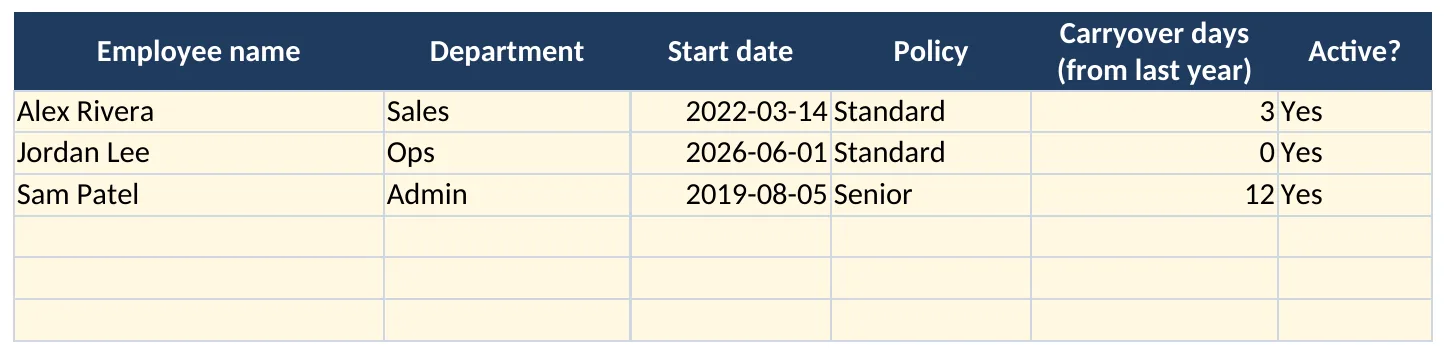
- Employees: one row per person with start date, department, policy and any days carried over from last year.
- Requests: log each request and pick the employee, leave type and status from dropdowns. Working days are counted for you.
- Done: the Balances and Calendar tabs update automatically.
What's inside
Employee roster
Name, department, start date, leave policy, carryover days from last year and an active flag.
Leave policies
Up to 5 policies, each with annual days and a maximum carryover. Comes with three editable examples: Standard, Senior and Part-time.
Your own leave types
Vacation, Personal, Sick, Bereavement and Unpaid are included, with room for two more. You choose which types count against PTO.
Company holidays
A list of up to 30 holiday dates. Holidays and weekends are skipped when days are counted.
Request log
Dropdowns for employee, leave type and status (Pending, Approved, Denied, Cancelled). Days are counted automatically, and half days are supported.
Automatic balances
Carryover (capped by policy), accrued so far this year (prorated for new hires), PTO taken, pending and available now. Negative balances are flagged in red.
Team calendar
A monthly grid showing who is off on which day. Approved and pending time off appear in different colors.
Other leave tracked too
Leave that doesn't count against PTO, like sick or unpaid days, is totaled in its own column so you still have the full picture.
No macros or scripts
Plain formulas only (NETWORKDAYS, SUMIFS, COUNTIFS). One .xlsx file that works in Google Sheets, Excel and LibreOffice.
See the actual spreadsheet
These are real renders of the file with its sample data, not mock-ups.


Simple pricing
Both versions have the same tabs and formulas. The only difference is how many people and requests they hold.
Lite
Free
- Up to 5 employees
- Up to 100 requests
- All tabs: Settings, Employees, Requests, Balances, Calendar
- Google Sheets, Excel, LibreOffice
- No sign-up, direct download
Full
$14 one-time
- Up to 100 employees
- Up to 2,000 requests
- Everything in Lite
- One .xlsx file, yours to keep
Secure checkout and instant download through Gumroad.
Questions
Does it work in Google Sheets or Excel?
Both. It's a standard .xlsx file that opens directly in Microsoft Excel and LibreOffice. In Google Sheets it works after you import it (see the next question). It uses only formulas that exist in all three, such as NETWORKDAYS, SUMIFS, COUNTIFS, VLOOKUP and EDATE.
How do I open it in Google Sheets?
Either way works:
- Open a blank sheet at sheets.google.com, go to File > Import > Upload, choose the .xlsx file, then pick Replace spreadsheet (or Create new spreadsheet) and click Import data.
- Or upload the file to Google Drive, open it with Google Sheets, then use File > Save as Google Sheets.
Then share the Google Sheet with whoever needs it.
How does accrual work? Are there presets?
The file comes with three example policies you can edit: Standard (15 days a year, up to 5 carried over), Senior (20 days, up to 10) and Part-time (8 days, up to 3). You can have up to 5 policies.
Accrual is spread evenly across the days of your year, so on any date an employee has earned their share of the annual allowance so far. New hires start accruing on their start date. It does not do per-pay-period, monthly or hours-worked accrual. If you need one of those, our free guide shows the formulas.
Does it use macros, scripts or add-ons?
No. It's formulas, dropdowns and conditional formatting only. There is nothing to enable and no permissions to grant.
Where is my data stored? Can you see it?
Your data stays in your own spreadsheet, in your own Google Drive or on your own computer. The file doesn't connect to anything and nothing is sent to us. We never see your employees' names or time off.
Can I track half days or hours?
The tracker counts in days. For a half day, type 0.5 in the "Days override" column. If you think in hours, enter the fraction of a day (for example 0.25 for 2 hours of an 8-hour day).
What workweek does it assume?
Monday to Friday. Weekends and the holidays you list in Settings are skipped when days are counted. If someone works a different schedule, use the "Days override" column for their requests.
Can employees submit their own requests?
It's built for the person who manages time off. If you share the Google Sheet with edit access, people can add rows, but there's no separate approval workflow or email notifications. A simple setup: people send their requests to the manager, who logs them.
How do I move from Lite to the full version?
The full version has the same layout, so you can copy your Settings, Employees and Requests rows across and the balances recalculate.
Is this legal or HR advice?
No. It's a tracking tool. Paid leave and sick leave rules vary by state and city, so check the laws that apply to your business when you set up your policies.
Something else? Send us a message.